 FGF DECK
Foundation: Galactic Frontier
How to earn more speed-ups
Build a steady stockpile through daily rewards, guild runs, and event chests you can reach.
Claim these first
- 1 · Active QuestsTake your activity chestsOpen Active Quests and claim the chests you’ve already earned.
- 2 · Trade NetworkStack your daily rewardsCheck Trader Commissions for speed-ups and complete Trade Network Events for the Home Port chest.
- 3 · EventsPick one more chestChoose an active milestone you can reach through tasks you already want to do.
If you’re one task away from an Activity chest, finish that before adding a long rally or excavation. Check reward icons for the speed-up type and duration you need.

Use guild runs to restock between events
- Tribute Vessels
- Join rallies your guild can finish reliably. Check the reward preview for speed-ups, coins, and materials so you get more than one thing from the run.
- Ruins Excavation
- Pick a Ruin with speed-ups listed in its rewards. Compare the quality and time commitment with the other tasks you could finish during that login.
- Guild Shop
- Use Guild Vouchers for speed-ups when they’re in stock and you need them for an upgrade. Compare Guild Shop buys before you spend the rest of your Vouchers.
- Unity Chests
- If you can earn Unity Chests on your server, open them for another chance at speed-ups and other rewards. Keep the rest of your routine going while you build up those chests.
Need more Guild Vouchers? Check Arms Race when it opens and join your guild’s runs for the reward milestones.
Earn chests with upgrades you already want
Open the active Top 100 Galactic Traders or Commerce Guild Duel stage. Check what scores and which chests contain speed-ups. Start an upgrade you need, then use the matching speed-ups to land on the chest you want.
Do other scoring tasks first when they’re useful on their own. An extra commission or rally can put you close enough to the next chest to save a stack. If the next reward costs more useful time than it gives you back, keep the rest for a stage that fits your plans.
Keep a stash for the timer that matters
Open Storage → Speed Up and check the types you’ve got. Use Building, Technology, or Shipbuilding speed-ups on their matching queues first when they can finish the job. Save Universal speed-ups for the queue that needs the help.
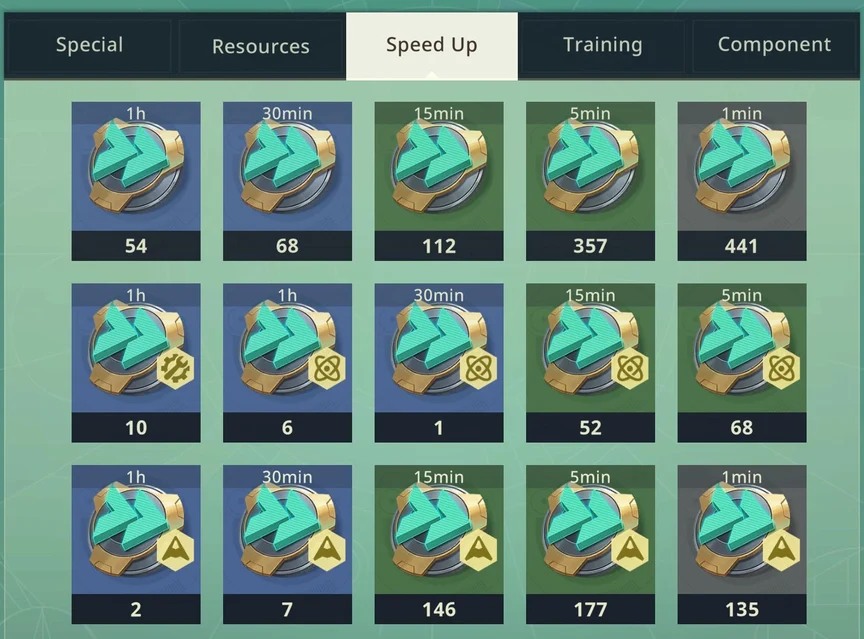
Want to hit a chest without burning the whole stack? Check the live points per minute and how long your task has left. Upload both screens to the Speed-up Calculator to see what you can reach.