 FGF DECK
Foundation: Galactic Frontier
Event Calendar Guide
Check your server’s next events, save the right items, and line up your fleets before guild fights.
Capture the clock, dates and event bars
Open Event Calendar on your server and close any pop-ups. Include the UTC Time line, the full date row and all visible event bars. Upload the screenshot to Event Planner. If your calendar has more rows below the fold, scroll and capture those too. Keep the date row visible on each capture.
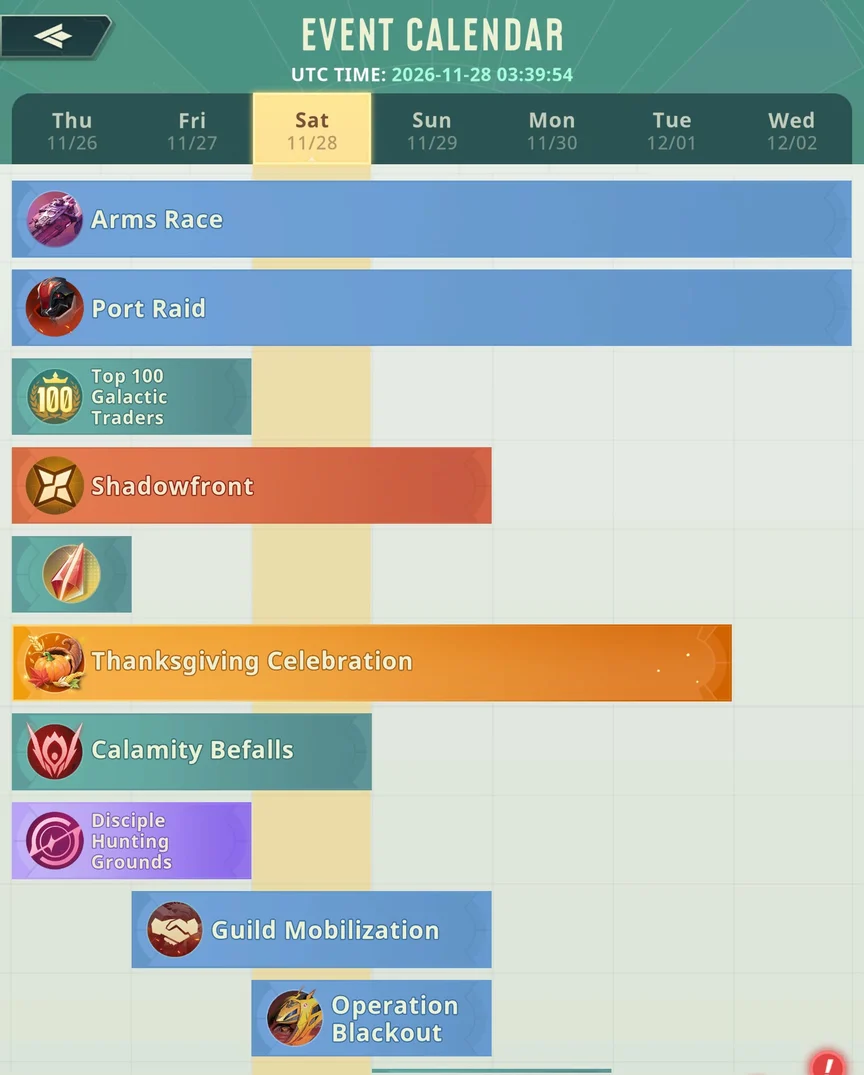
Read the color-coded prep calendar
On this calendar, Guild Mobilization covers Friday through Sunday and Operation Blackout covers Saturday and Sunday. A bar can extend beyond the dates on screen. Tap the event tab for its full dates, start time and phase schedule. Times shown in game are UTC.
Your upload opens the prep calendar. Filter by Speed-ups, Recruitment, Activity, PvE, PvP, Crew & Nexus or Flagship upgrades. Swipe across on a phone and tap a bar for what to save, spend or bring.
A short bar can show an event icon by itself. The red shard in this capture is Starry Recruitment. Use Edit schedule to correct a name or date, or open Compare with your screenshot while the preview is available.
If a bar says Check phase day, tap it to see the day-by-day prep. Confirm Day 1 in the event screen and enter its UTC date to place the phases into the week. Calendar edges can cut off the earlier days of multi-day events.
What to hold for each scoring day
Top 100 Galactic Traders and Commerce Guild Duel often use a similar prep order. Open Points each day for the exact actions on your server. Dominion Warzone uses its own live stage list.
- Development. Queue Building or Shipbuilding upgrades. Use Technology time here only when it scores and closes a chest gap. Do eligible rallies or trade tasks first.
- Champions. Save fragments, Training Manuals and Venturous Memories. Count eligible Trader Commissions before spending.
- Technology and Crew. Save Technology time, Computational Components, Deep Space Beacons and Echoes of Deep Space.
- Flagship. Bank Blueprints, Prismatic Cores and matching Flagship Component upgrades.
- Mixed scoring. Check which earlier actions return. Save repaired fleets and spare Combat Craft for the fight.
- Battle or late scoring. Coordinate with your guild for Battlefield Showdown or Interrealm Expedition. Check the live Top 100 tab for Hunting Grounds or your rotation’s final objectives.
If your Commerce Guild Duel shows Stand Down, open its recovery quests after Duel Day.
Give each upcoming event a job
- Guild Mobilization · Reach your next Personal Points chest
- Check the Solo and Commerce Guild reward tracks. Turn in Trader Commissions, then count your planned Champion and Flagship upgrades. For a stage awarding 25 points per speed-up minute, 10 hours give 15,000 points. Save the rest of your speed-ups for another chest or event.
- Operation Blackout · Save AP for rallies
- Clear Tithe Collectors, then join your guild’s Tithe Fleet rallies. Reserve AP for the rallies you can attend and compare their reward previews before spending the rest.
- Arms Race and Shadowfront · Confirm your role
- Bring a rally-ready fleet to Arms Race. In Shadowfront, ask your guild which objective to take or reinforce and have your assigned fleets ready for the battle window.
- Season 2 · Prepare for Vanguard or station defense
- Check Magnetic Storm Resistance before Pathbreaker Operation. For Aromabloom Trade War, find and analyze treasure at your guild’s station and keep fleets nearby to defend it.
- Combat Lab and United Frontline · Bring the right team
- Bring a ground squad to Combat Lab and check the buff each stage gives you. Bring repaired fleets to United Frontline and coordinate the Immortal Ascendancy Shrine fight.
- Thanksgiving Celebration · Reserve Wheat Coins
- Choose a reward in the Thanksgiving Bazaar, set its price aside and spend the surplus before conversion. Read the closing countdown and Conversion Notice in the shop.
When events overlap, open the scoring screen for each and pick the reward you want to reach. Use your current stage’s rates in the Speed-up Calculator.